
You need enough space so you can swing your golf clubs safely without hitting anything. This means you need enough width, length, and height for your body and the club.
Setting up a golf simulator at home is exciting. It lets you play golf year-round, no matter the weather. But the big question is always about space. How much room do you really need? The right amount of space is key for safety and a good simulation experience. We will look at the sizes needed for different types of setups. This guide will help you figure out the best space for a golf simulator in your home.
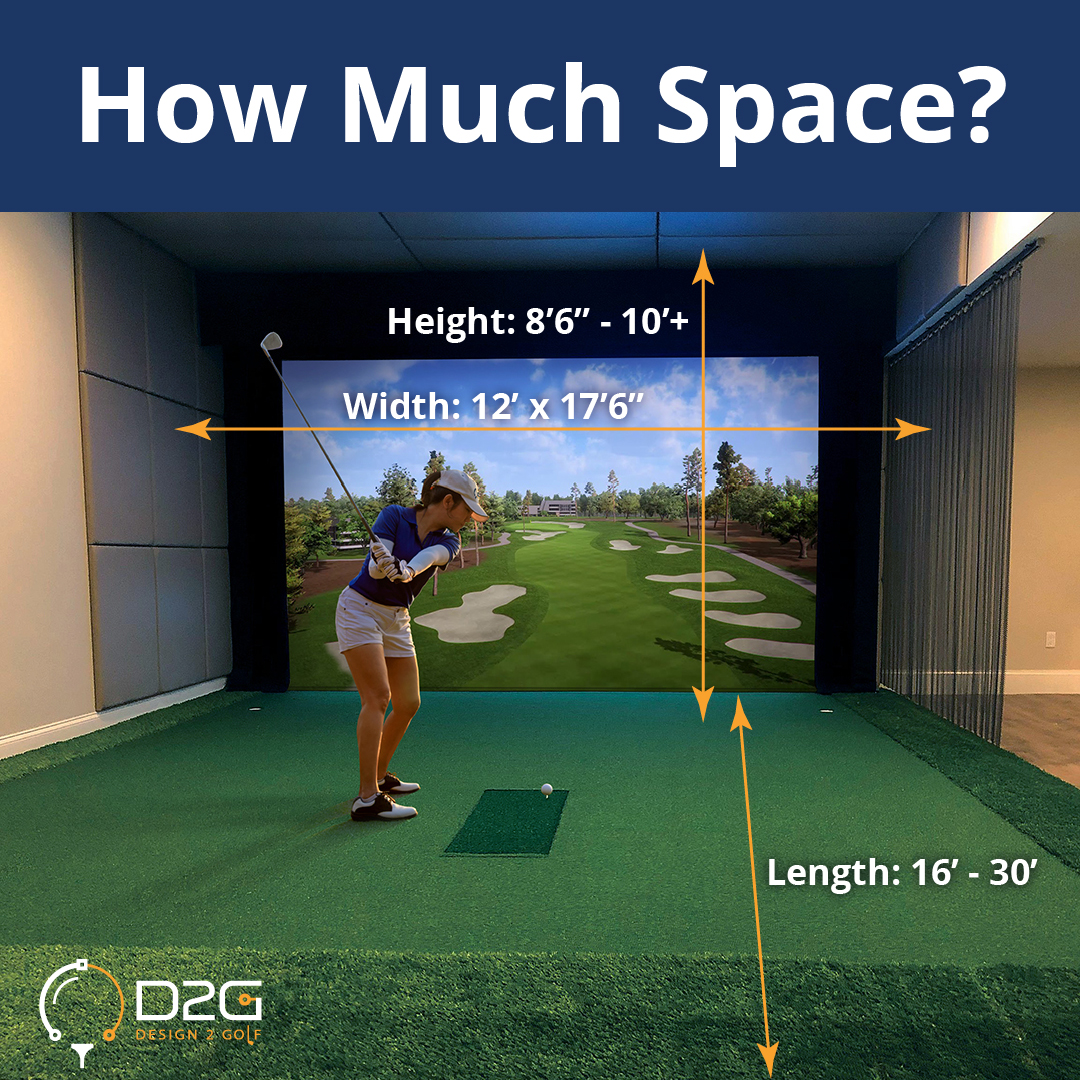
Image Source: www.design2golf.com
Deciphering Minimum Space for Golf Simulator Requirements
The minimum space for a golf simulator depends a lot on the golfer. Are you a short hitter, or do you have a powerful swing? Tall golfers need more height. The type of launch monitor also plays a small role, but the swing space is the main concern.
Key Dimensions to Consider
Every home golf setup needs three main measurements: height, width, and depth (length). Getting these right means you can swing freely and the ball tracking works well.
Golf Simulator Ceiling Height Needs
Golf simulator ceiling height is often the biggest problem in home setups. If the ceiling is too low, you cannot use your driver safely. Hitting the ceiling during a full swing is dangerous and damages the ceiling.
| Golfer Club Used | Minimum Recommended Ceiling Height | Ideal Ceiling Height |
|---|---|---|
| Irons Only | 8.5 feet | 9 feet |
| Driver & Full Swing | 10 feet | 10.5 feet or higher |
A good rule of thumb: measure the longest club you use (usually the driver). Add the height of the tallest golfer who will use the system. Then, add at least one foot of buffer space above the top of the swing arc.
Golf Simulator Width Requirements
Width is crucial for safety and for the ball to fly straight into the screen. If the area is too narrow, you might hit a wall with your follow-through.
- Swing Buffer: You need space on both sides of your hitting mat. This is for your backswing, downswing, and follow-through.
- Ball Path: The ball needs a straight path to the screen.
For an average adult golfer, you should aim for at least 10 feet of width. Tall or powerful golfers might need 12 to 15 feet for absolute comfort and safety.
Golf Simulator Depth (Length) Requirements
Depth is the distance from where you stand to the screen, plus the space behind you. This space must fit the hitting area, the ball flight path, and the space behind the golfer.
- Screen Distance: The ball needs room to travel before hitting the screen.
- Golfer Buffer: You need space behind you to address the ball and take a comfortable backswing without hitting a wall.
Generally, a depth of 15 feet is the absolute minimum for a functional setup using a driver. Longer setups (18 to 20 feet) offer a much better playing experience.
Mapping Out Your Golf Simulator Room Dimensions
When planning your home golf simulator area, think about the total room size needed, not just the hitting zone. A dedicated room is ideal, but many people use garages or basements.
Standard Golf Simulator Room Dimensions
For a comfortable and safe experience for most golfers, look for these general room sizes:
- Minimum Viable Room: 10 ft Wide x 15 ft Deep x 9 ft High
- Recommended Comfortable Room: 12 ft Wide x 18 ft Deep x 10 ft High
- Ideal Enthusiast Room: 15 ft Wide x 20 ft Deep x 11 ft High
These dimensions allow for a decent golf simulator screen size and enough room for spectators or peripheral equipment.
Garage Golf Simulator Space Considerations
The garage golf simulator space is a popular option because garages often offer high ceilings and large open areas.
- Ceiling Height Check: Garages often have high ceilings, which is great. Always check for exposed beams, garage door tracks, or overhead storage. These obstructions reduce usable height.
- Width for Swing: Two cars wide usually means 20 to 24 feet of width, which is plenty for a simulator and equipment storage on the sides.
- Floor Level: Ensure the floor is level. Uneven floors can affect launch monitor accuracy, especially camera-based systems.
Indoor Golf Simulator Requirements Beyond Size
Indoor golf simulator requirements involve more than just the physical space. You also need to think about lighting, flooring, and cooling.
- Lighting: You need soft, even lighting around the hitting area. Direct, bright lights hitting the screen can cause glare. The area directly around the hitting mat, where the ball travels, should be slightly darker than the hitting spot itself.
- Flooring: Use turf for the hitting area. The rest of the room can have carpet or foam flooring to reduce noise and improve comfort.
- Climate Control: If setting up in a basement or garage, ensure proper ventilation. Projector heat and physical exertion require good airflow.
Sizing Your Golf Simulator Enclosure Size
The golf simulator enclosure size defines the boundaries of your hitting bay. This includes the screen, side netting, and the impact screen material itself.
Components of the Enclosure
The enclosure protects your walls and ensures the ball returns accurately or stops safely.
- Impact Screen: This is the surface the ball hits. Screen size directly influences the immersive feel. Bigger screens are better.
- Side Netting/Walls: These absorb errant shots, protecting everything outside the hitting lane.
If you buy a complete enclosure kit, the manufacturer will specify the required room size based on their unit. Always buy the enclosure size that matches or is slightly smaller than your available space. Do not squeeze a large enclosure into a tight room.
Choosing the Right Golf Simulator Screen Size
The golf simulator screen size dramatically affects immersion. A small screen feels like looking through a window; a large screen feels like being on the course.
| Screen Aspect Ratio | Recommended Viewing Area (Inches) | Ideal Room Depth (Feet) |
|---|---|---|
| 4:3 Standard | 100 to 130 inches | 15 to 17 |
| 16:9 Widescreen | 130 to 150 inches | 17 to 19 |
| Panoramic/Large | 150 inches and up | 20+ |
A 16:9 screen is popular today because it matches modern TV aspect ratios, giving a better visual experience for course flyovers and general graphics.
Adapting Space for Different Setup Types
Not everyone has a dedicated 15×20 foot room. You must adapt your setup based on the space you have.
The Compact Golf Simulator Setup
If space is extremely limited, you might need to sacrifice the driver. This is where you focus on iron play and putting.
- Focus: Irons and Wedges.
- Ceiling: Must still be high (minimum 9 feet).
- Depth Reduction: You might only manage 12 to 14 feet of depth. You must stand closer to the screen (8-10 feet) and use shorter clubs.
- Width Solution: Use flexible netting instead of rigid frames on the sides. This lets you push the netting closer if you step slightly off-center for a specific swing.
The Backyard Golf Simulator Setup
A backyard golf simulator setup usually means using a high-quality, weather-resistant outdoor enclosure. This introduces new space considerations.
- Ground Stability: The ground must be perfectly flat and solid. Concrete or a deck is best. Soft ground shifts, ruining alignment.
- Protection: You need shelter from rain, sun, and wind. A permanent, sturdy structure (like a pavilion or high-end carport) is necessary to protect electronics and the screen.
- Distance from Property Lines: Check local rules regarding height restrictions for structures on your property.
Portable and Temporary Spaces
Can you use a living room? Yes, but with compromises.
- Safety First: You must use high-quality netting that extends well behind and to the sides of the golfer.
- Screen Type: Use a high-quality, slightly thicker screen material that can absorb high-speed impact without needing a rigid frame behind it (though a frame is always better).
- Projector Distance: Portable setups often use short-throw or ultra-short-throw projectors. These require less depth because the projector sits very close to the screen, saving valuable room length.
Fathoming the Impact of Launch Monitor Technology on Space
The type of launch monitor you choose influences your required space, especially depth.
Radar-Based Monitors (e.g., Trackman, GCQuad outdoors)
Radar units measure the ball after it leaves the clubface. Outdoors, they need several yards of space for accurate measurement. Indoors, they are usually placed slightly behind and to the side of the hitting mat.
- Space Impact: Less sensitive to precise depth constraints right in front of the screen, but they still need room behind the golfer for clear radar readings of the club path.
Camera/Infrared Monitors (e.g., Uneekor, SkyTrak)
These are placed either on the floor facing the ball or mounted overhead (ceiling mount).
- Floor Unit: Needs clear space on the floor in front of the ball for the unit itself. This adds a small amount of required depth measurement right at the hitting spot.
- Ceiling Unit: Requires enough space above the hitting area for mounting hardware, ensuring the club head clears the unit during the backswing. This directly affects golf simulator ceiling height needs. An overhead unit might require an extra 6 to 12 inches of ceiling clearance compared to a floor unit.
Maximizing Space Efficiency
If your available area is slightly smaller than the ideal, here are techniques to maximize what you have.
Utilizing Short Throw Projectors
Short-throw (ST) and Ultra-Short-Throw (UST) projectors are game-changers for small spaces.
- Standard Projector: Needs 12 to 15 feet of distance from the screen to create a large image. This eats up depth.
- UST Projector: Sits only inches away from the screen. This can easily save 5 to 8 feet of depth, making a 14-foot room much more usable for driver swings.
Creative Width Solutions
If you are short on width (e.g., only 9 or 10 feet wide):
- Step Position Offset: Instead of standing dead center, position your hitting mat slightly to one side (say, 1 foot right). This gives you more lateral room for your follow-through on that side.
- Netting Over Rigid Frames: Use high-quality, heavy-duty netting attached to ceiling tracks or heavy stands instead of fixed, rigid frames. This allows you to pull the netting in slightly when not in use or adjust side placement based on the golfer’s dominance (lefty vs. righty).
Safety Protocol in Tight Spaces
When space is tight, safety is paramount.
- Mandatory Barriers: Never skip side netting or barriers if you are close to walls or objects.
- Swing Check: Before ever hitting a ball, take several full, slow-motion practice swings. Check where the club head comes close to the ceiling, walls, and side netting. Mark these spots clearly with tape.
Setting Up for Spectators and Comfort
A great golf simulator setup is not just for the person hitting the ball. Friends and family will want to watch.
Viewing Area Placement
Spectators need to be safely outside the hitting lane.
- Side Viewing: If you have a wide room (14+ feet), spectators can sit safely to the sides of the hitting mat.
- Rear Viewing: If the room is deep enough (18+ feet), you can place chairs behind the golfer. Ensure these chairs are well outside the area where the golfer steps back after a shot.
Peripheral Equipment Space
Your setup needs space for supporting gear:
- Computer/Monitor: Needs a small table or dedicated shelf space, usually near the hitting area but out of the way of the ball path.
- Launch Monitor Base: If using a floor unit, the area around it must be kept clear so no one trips over the cables or the unit itself.
For a truly enjoyable golf simulator room dimensions, plan for an extra 3 feet of clear space on the sides and rear of the hitting zone for comfort and equipment placement.
Frequently Asked Questions (FAQ) About Simulator Space
Q: Can I use a commercial-grade launch monitor in a small room?
A: Yes, many commercial-grade monitors work very well in smaller spaces if you adapt your club selection. For example, a high-end ceiling-mounted unit might track your 7-iron perfectly in a 9-foot ceiling room, even if your driver won’t fit.
Q: What is the absolute minimum height if I only plan to use wedges?
A: If you are certain you will never use anything longer than a 7-iron (and you are not very tall), you might manage with an 8-foot ceiling. However, 8.5 feet is strongly advised even for iron-only play to allow for a safe backswing arc without scraping the ceiling.
Q: How does the projector placement affect the room dimensions?
A: Standard projectors require significant depth because they must sit far back from the screen. UST projectors drastically reduce the required depth, allowing you to dedicate more length to the ball flight path or room behind the golfer. Choosing a UST is often the best way to meet indoor golf simulator requirements in a shallow room.
Q: Do I need a dedicated room for a good golf simulator?
A: No, but it helps immensely. A basement, spare bedroom, or garage can work perfectly, provided you can meet the height requirements and control ambient light. Basements often provide the best light control.
Q: What is the best material for walls adjacent to the hitting area?
A: Use impact netting rated for high speed (at least 100 mph closure speed rating). If you want a permanent look, use golf netting installed slightly off the wall, leaving an air gap. This helps absorb energy better than just hitting a drywall.