
The golf simulator cost can range from as little as \$500 for a basic setup to over \$100,000 for a top-tier commercial installation. A good home golf simulator price for a quality setup usually starts around \$3,000 to \$5,000.
Building your own golf simulation space is a dream for many golfers. It offers practice anytime, rain or shine. But the big question is always the price. How much will it really cost you? This guide breaks down every expense. We look at budget options, mid-range favorites, and professional setups.
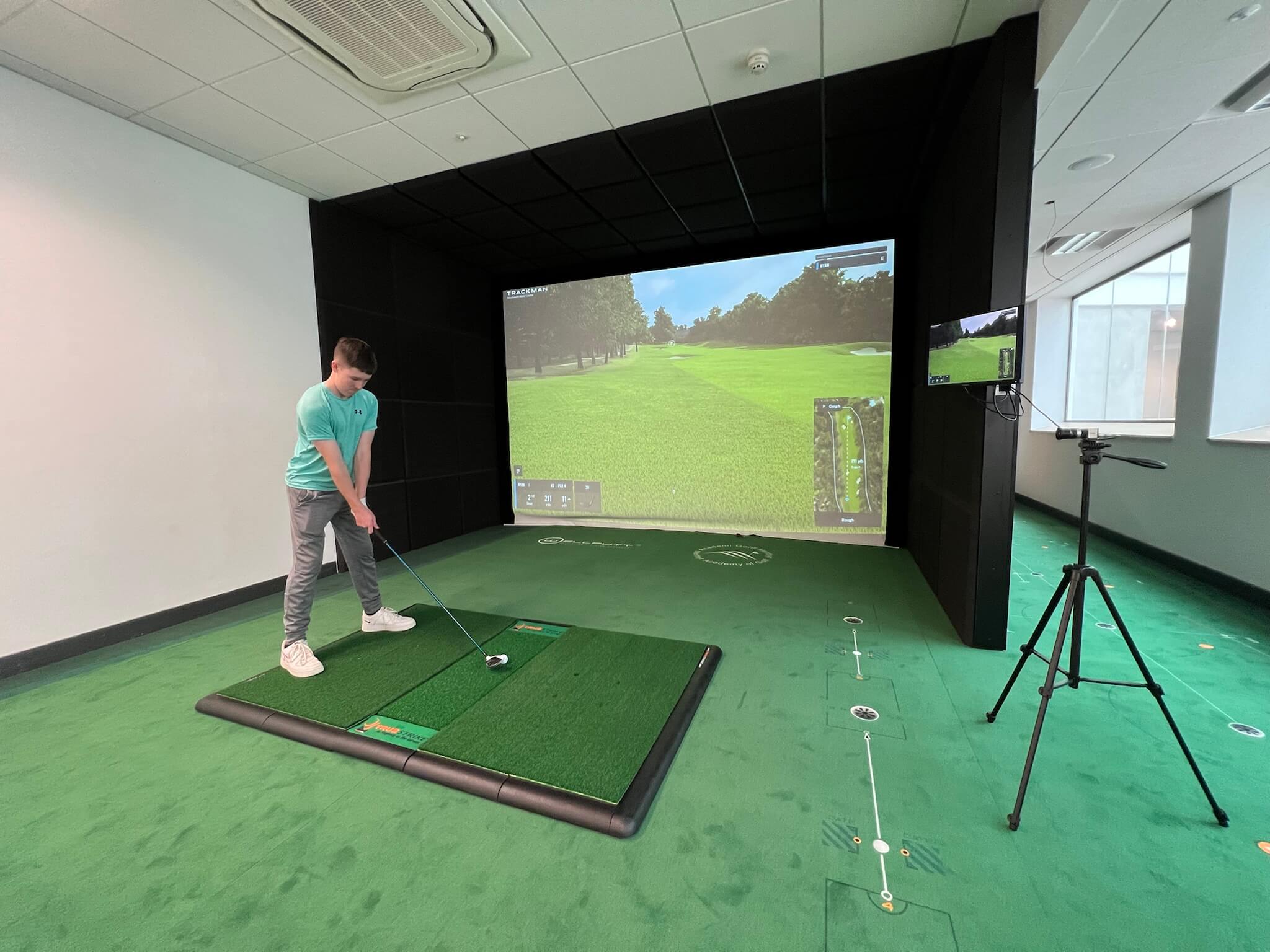
Image Source: www.golfswingsystems.co.uk
Deciphering the Core Components of a Golf Simulator
A golf simulator is not one single item. It is a system made of several key parts working together. Each piece adds to the total golf simulator setup cost. Knowing these parts helps you budget better.
The Launch Monitor: The Brain of the System
The launch monitor is the most crucial part. It tracks your swing, ball speed, launch angle, and spin. This data is what makes the simulation real. The cost of launch monitor for golf simulator varies widely based on accuracy and features.
Types of Launch Monitors
| Type | How It Works | Typical Price Range | Best For |
|---|---|---|---|
| Camera-Based (Photometric) | Uses high-speed cameras to take pictures of the ball/club. | \$1,500 – \$15,000+ | High accuracy indoors; needs good lighting. |
| Doppler Radar | Sends out radio waves that bounce off the ball and club. | \$400 – \$15,000+ | Great for outdoor use; some indoor limitations. |
| Infrared/Optical | Uses light sensors; often found in older or basic units. | \$300 – \$1,000 | Entry-level tracking; less detailed data. |
For a solid mid-range system, expect to spend \$2,000 to \$5,000 on a good launch monitor. This is often the single most expensive component.
The Impact Screen and Enclosure
You need a place for the ball to hit. This is the screen. The screen must be strong enough to stop a fast-moving golf ball safely. It also needs to show the simulation image clearly.
Golf Simulator Screen Price Factors
The size and material greatly affect the golf simulator screen price.
- Size: A standard 10-foot wide screen is common for home use. Larger screens cost more.
- Material Quality: High-quality screens offer better image clarity and last longer against repeated impact. Cheap screens can sag or degrade quickly.
A good quality, large impact screen and the necessary frame or enclosure will typically cost between \$800 and \$2,500. Professional enclosures add significantly to this cost but offer maximum safety.
Software and Simulation Packages
The hardware is useless without software. This is the game engine. It renders the courses, processes the launch monitor data, and provides feedback.
- Basic Software: Often comes bundled with the launch monitor. It might only offer basic driving range practice.
- Premium Software: Features famous courses (like Pebble Beach or St Andrews), detailed swing analysis, and online play. Brands like E6 Connect, Foresight Sports GSX, or TrackMan software command higher fees.
Software costs can be a one-time purchase (\$500 – \$3,000) or require an annual subscription (\$100 – \$500 yearly).
The Computer or Tablet
The software needs a device to run it. High-end simulation graphics demand a powerful computer.
- Low-End: A modern iPad or tablet can run simpler simulators. Cost: \$400 – \$1,000.
- High-End: For photo-realistic graphics and fast frame rates, you need a gaming-grade PC with a strong graphics card (GPU). This can add \$1,500 to \$4,000 to your total home golf simulator price.
Projector
You need a projector to display the course onto the screen. Key factors here are lumens (brightness) and resolution.
- Lumens: You need high lumens (3,000+) if your room has ambient light.
- Resolution: 1080p is standard; 4K offers the best picture quality but costs more and requires a powerful PC.
A decent short-throw or ultra-short-throw projector adds \$700 to \$3,000 to the setup.
Budgeting for Your Golf Simulator: Finding the Best Budget Golf Simulator
If you are looking to keep costs low, focus on combining affordable core technology with DIY elements. This targets the DIY golf simulator cost range.
The Sub-\$1,500 Setup
Can you build a functional simulator cheaply? Yes, but expect trade-offs in accuracy and immersion.
- Launch Monitor: Look for older model photometric systems or entry-level radar units often found used or during sales. (Approx. \$300 – \$600).
- Screen: Use a thick, heavy-duty drop cloth or a blackout curtain as a makeshift screen. (Approx. \$100).
- Enclosure: Use PVC piping or metal framing to build a simple frame for hanging the screen. (Approx. \$150).
- Computer/Display: Use an existing laptop and a basic 1080p projector you already own, or borrow one. (Approx. \$0 – \$300).
- Software: Use free trial versions or very basic, included software.
Total Estimated DIY Golf Simulator Cost: Under \$1,500. This is a functional range setup, but it won’t have the fidelity of premium systems.
The Mid-Range Home Setup (\$3,000 – \$8,000)
This bracket is where most dedicated golfers start. It offers a fantastic balance between performance and price. This is the typical home golf simulator price sweet spot.
- Launch Monitor: A highly respected unit like a FlightScope Mevo+ or a specific indoor photometric unit designed for smaller spaces. (Approx. \$1,800 – \$3,500).
- Screen/Enclosure: A dedicated impact screen with side netting or a partial enclosure kit. (Approx. \$1,000 – \$1,800).
- Projector: A good quality 1080p short-throw projector. (Approx. \$800 – \$1,200).
- Software: A subscription or license for a reputable simulation package. (Approx. \$500 upfront).
This setup delivers reliable data and immersive graphics for hours of fun practice.
Assessing Indoor Golf Simulator Pricing Tiers
We can categorize simulator pricing into three main tiers based on the level of realism and data provided.
Tier 1: Entry-Level/Budget Simulators (Under \$3,000)
These are often portable systems or basic packages designed for casual use.
- Focus: Basic ball speed and direction.
- Data: Limited metrics (carry distance, ball speed).
- Experience: Good for chipping and driving range practice, but course graphics may be dated.
Tier 2: Mid-Range Performance Simulators (\$5,000 – \$15,000)
This is the sweet spot for serious amateur golfers. The technology is excellent, providing full swing analysis without the professional price tag.
- Focus: High accuracy and detailed swing metrics (spin rates, attack angle).
- Hardware: Reliable camera-based units or advanced portable radar systems.
- Immersion: Excellent graphics and durable screen materials.
Tier 3: High-End and Commercial Simulators (\$20,000+)
These systems use industry-leading technology, often ceiling-mounted camera arrays or cutting-edge radar. This is the high-end golf simulator price point.
- Focus: Absolute precision, often used for club fitting or professional instruction.
- Hardware: Top-tier photometric systems (like TrackMan or GCQuad) integrated into a custom build.
- Installation: Often requires professional installation and calibration, including floor mats and precise leveling.
The Commercial Golf Simulator Cost Factor
If you plan to install a simulator for a business—a simulator center, a teaching facility, or a high-end entertainment venue—the costs escalate quickly.
Commercial golf simulator cost includes more than just hardware:
- Durability: Commercial units must withstand thousands of swings daily. Components must be top-of-the-line and rated for heavy use.
- Space Requirements: Commercial bays are often much larger (15x15x10 feet minimum) to accommodate faster swings and full driver usage comfortably.
- Insurance and Licensing: Businesses need appropriate liability insurance and often pay higher licensing fees to software providers for public use.
- Aesthetics: Commercial builds usually include custom carpentry, premium flooring, dedicated HVAC, and high-end furniture.
A basic commercial setup starts around \$30,000. A premium, multi-bay facility can easily cost hundreds of thousands of dollars.
Hidden Costs: What Else Adds to the Golf Simulator Setup Cost?
People often focus only on the launch monitor and screen. However, infrastructure costs can significantly increase the final bill.
1. Room Preparation and Construction
Is your space ready? If not, you must budget for:
- Ceiling Height: This is non-negotiable. You need at least 9 feet, but 10 feet or more is strongly recommended, especially for taller players using a driver.
- Room Dimensions: Adequate width and depth ensure you aren’t cramped and that the projector can be placed correctly.
- Flooring: Carpet or specialized hitting mats are needed. Turf mats designed for golf offer better feel and longevity. (Cost: \$200 – \$1,000).
- Lighting: You may need to black out windows or install specific ambient lighting to avoid glare on the screen or interference with the camera-based launch monitor.
2. Premium Mats and Turf
A standard rubber mat is harsh on joints and clubs. A multi-layer hitting system with real-feel turf is vital for a good experience.
- Fairway Mat: For chipping and iron shots.
- Divot Mat: A thicker area where you can actually take a divot without damaging the floor underneath.
Quality hitting mats can cost from \$300 to \$1,500 depending on size and complexity.
3. Installation and Calibration Fees
Unless you are very technically savvy, you will pay someone to install and calibrate the system. Getting the launch monitor, projector distance, and screen alignment perfect is critical for accurate tracking. This can add \$500 to \$2,000 depending on complexity.
4. Accessories and Upgrades
Don’t forget the smaller necessities:
- Ball Trays: Keep practice flowing.
- Headphones/Speakers: For ambient sound or instructions.
- Second Launch Monitor: Some users buy both an indoor unit and a portable unit for use at the range.
- Swing Cameras: Adding high-speed cameras specifically for analyzing swing mechanics, separate from the launch monitor system.
Comparing Pricing: DIY Golf Simulator Cost vs. Buying a Package
Should you buy a pre-made package or build it piece by piece?
| Feature | DIY Approach (Piece by Piece) | Package Deal |
|---|---|---|
| Initial Cost | Potentially lower starting point. | Often slightly higher initial price tag. |
| Component Choice | Complete control over every brand and model. | Components are pre-selected to work together. |
| Compatibility Issues | High risk of incompatible parts (e.g., software not reading the launch monitor correctly). | Low risk; the vendor guarantees functionality. |
| Time Investment | Very high; requires extensive research and troubleshooting. | Low; usually quick setup guided by instructions. |
| Support | You are your own support team. | Direct manufacturer or vendor support. |
For beginners, a reputable package deal often saves time and frustration, justifying a slightly higher golf simulator cost upfront. If you are technically skilled and enjoy projects, the DIY route offers the best path to the best budget golf simulator that fits your specific space constraints.
Fathoming Factors Affecting the Golf Simulator Cost
Several variables dictate where your final price lands. Recognizing these factors helps tailor your budget.
Launch Monitor Technology Dominance
As noted, the cost of launch monitor for golf simulator is the biggest variable. Photometric systems (multiple cameras) are generally more expensive than pure radar units because they capture more data points immediately upon impact.
Software Licensing Structure
Some companies offer perpetual licenses. Others push annual subscriptions. If you plan to use the simulator for five years, a recurring \$300 fee adds \$1,500 to your total cost. Always factor in the 3- or 5-year total cost of ownership, not just the initial purchase price.
Quality of Enclosure Materials
A cheap screen can cost \$500. A professional, multi-layer ballistic netting system with a high-end, triple-layer impact screen can be \$4,000 or more. The cheaper option might break down after a year of heavy use, forcing you to spend more later. Invest upfront in screen durability.
Projector Features
The move to 4K resolution significantly increases projector cost, but the visual improvement is dramatic on a large screen. Short-throw projectors are essential if your room depth is limited, and these specialized lenses carry a premium price tag over standard throw models.
Is a High-End System Worth the High-End Golf Simulator Price?
For the dedicated instructor, club fitter, or the very serious enthusiast who practices every day, the answer is often yes.
A top-tier photometric system tracks every nuance: clubface angle, path, lie angle, and precise ball flight characteristics. This data translates directly into better club fitting results and faster swing improvements.
If you are looking at packages over \$25,000, you are buying precision that often rivals actual outdoor conditions. You are paying for consistent accuracy across all clubs, in all lighting conditions, without needing to reposition the unit frequently. For these users, the cost is an investment in performance improvement.
Frequently Asked Questions (FAQ)
How much does a basic golf simulator cost to set up?
A basic, entry-level golf simulator cost can start around \$1,500 to \$2,500. This usually involves a budget launch monitor, a simple screen setup, and utilizing existing computer equipment.
Can I save money by buying the launch monitor separately?
Yes. Buying the cost of launch monitor for golf simulator and the golf simulator screen price separately is the core of the DIY approach. This allows you to shop for deals on each component, which often results in a lower DIY golf simulator cost than buying a bundled package, provided you manage compatibility well.
What is the average home golf simulator price for a good quality system?
The average price for a reputable, high-performing home golf simulator price that offers excellent data and graphics falls between \$5,000 and \$10,000. This typically covers a strong launch monitor, a decent projector, and a full enclosure kit.
Does the room size significantly impact the indoor golf simulator pricing?
Yes. Very small rooms (less than 9 feet high) severely limit your options, often forcing you to purchase more expensive specialized equipment (like ultra-short-throw projectors) or restrict your ability to use a driver fully. Larger rooms allow for more flexible and often cheaper component placement.
Are there any affordable radar units that work well indoors?
Several modern radar units, particularly those that use dual radar or advanced signal processing, perform surprisingly well indoors now. However, extremely reflective surfaces or certain ceiling heights can still cause minor interference compared to dedicated photometric systems. Look for newer models advertised specifically for indoor use to find the best budget golf simulator radar option.